
Before You Start
- You must be an admin on your Airbo account.
What Archiving Does
When a Highlight reaches its end date, the content itself stays visible on the board.
If the Highlight is no longer relevant, archiving is the way to fully remove employee access. Once archived, employees can no longer view the Highlight or its content.
Note: Archiving is different from deleting. Archived Highlights can still be reviewed by admins and data accessible. Deleted Highlights are moved to a Deleted tab and removed after 30 days.
How to Archive a Highlight
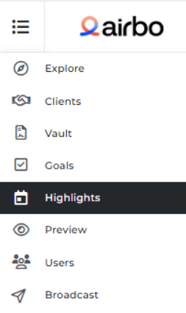
Step 1: Go to your Highlights tab
Log in to your Airbo admin account and navigate to the Highlights tab.
Step 2: Find the Highlight you want to archive
Locate the Highlight in your list of active Highlights.
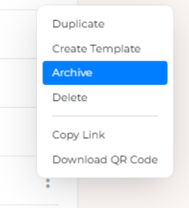
Step 3: Open the Highlight menu
- Click the three-dot icon (⋮) next to the Highlight.
- Select Archive from the dropdown menu.
Step 4: Confirm the archive
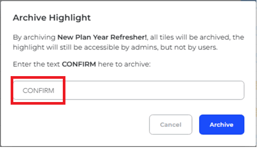
- A confirmation window will appear.
- Type CONFIRM in all caps in the text field.
- Click the button to archive the Highlight.
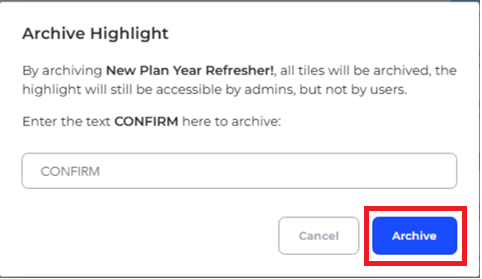
What you'll see: The Highlight will be removed from the Active tab and moved to the Archive tab. Employees will no longer be able to access it.
How to Review Archived Highlights
You can view all previously archived Highlights at any time.
- Go to the Highlights tab.
- Click on the Archive tab at the top.
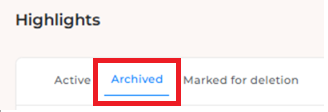
- Browse your list of archived Highlights.
Tips for Success
- Do this: Archive Highlights that are outdated or no longer relevant, like past Open Enrollment campaigns.
- Avoid this: Don't archive a Highlight if you still want employees to access the content, even after the end date has passed.
Remember: Reaching the end date does not automatically archive a Highlight. You need to archive it manually if you want to remove employee access.
Troubleshooting
I archived a Highlight by mistake.
Check the Archive tab under Highlights. If you need to restore it, contact your CSM or Airbo support for assistance.
Employees can still see a Highlight after the end date.
This is expected. The end date only stops promotion (like sending posts). To fully remove access, you need to archive the Highlight.
Related Articles
- How to Create a Highlight
- Hiding Tiles
- How to Edit Your Highlight Tiles
- Do Employees Lose Access After the Highlight Ends?
Need more help? Contact support@airbo.com