
Before You Start
- You need admin access to your Airbo board
- You should already know how to create a broadcast message (see: How to Send a Broadcast Message)
Time needed: 5 minutes to review
What Is Link Tracking?
Link tracking lets you see how people interact with the links in your broadcast messages. Instead of guessing whether employees read your messages, you can see real numbers.
Here's what you can track:
- Email broadcasts: Open rates and link clicks
- Text (SMS) broadcasts: Link clicks
This data helps you understand what's working and adjust your communication strategy over time.
How Link Tracking Works for Emails
Email link tracking is automatic. You don't need to turn anything on.
When you send an email broadcast that includes a link, Airbo tracks two things:
- Opens: How many people opened the email
- Link clicks: How many people clicked a link inside the email
You'll see both total counts and unique counts in your reports. Total counts include repeat actions. Unique counts show how many individual people took the action.
Tip: If your open rates are low, try testing different subject lines. A clear, short subject line often gets better results.
How Link Tracking Works for Text Messages
Text message tracking works a little differently. You have the option to turn it on or off for each message.
How to Enable Link Tracking for a Text Message
- Go to Broadcasts and create a new text or email & text broadcast.
- Fill in your message content on the Compose Text Message step.
- Look for the Track Link Clicks toggle at the bottom of the compose area.
- Make sure the toggle is on (blue) to enable tracking.
What you'll see: When tracking is turned on, any links in your text message will be shortened. They will appear as link.airbo.com/... instead of the original URL.
Show Image The Compose Text Message screen showing the Track Link Clicks toggle at the bottom.
How to Disable Link Tracking for a Text Message
- On the Compose Text Message step, find the Track Link Clicks toggle.
- Turn the toggle off to disable tracking.
What you'll see: Your original links will appear as-is in the text message. No click data will be collected for that message.
Note: Shortened links (link.airbo.com/...) are only used when tracking is turned on. If you prefer employees to see the full original URL, simply turn tracking off.
Viewing Your Broadcast Reports
All of your broadcast tracking data lives in one place: the Reports section of your board.
How to Find Your Broadcast Reports
What you'll see: A list of all your sent broadcast messages, with performance metrics displayed for each one.
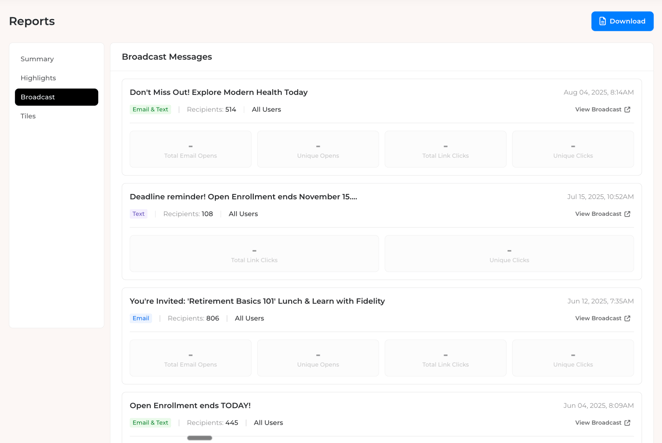
The Broadcast Reports view shows performance data for each message.
Note: Broadcasts sent before this feature was released (February 2026) will not have tracking data. You'll see dashes in place of metrics for older messages. Tracking only applies to broadcasts sent after the update.
Understanding the Metrics
Each broadcast message shows the following data:
- Total Email Opens: The total number of times the email was opened (includes repeat opens)
- Unique Opens: How many individual people opened the email
- Total Link Clicks: The total number of times links were clicked (includes repeat clicks)
- Unique Clicks: How many individual people clicked a link
For text-only broadcasts, you'll see link click metrics (Total Link Clicks and Unique Clicks) if tracking was enabled.
Tip: Compare Unique Opens to your recipient count to get a quick read on how many people are engaging with your messages. If you sent to 500 people and 200 uniquely opened, that's a 40% open rate.
Tips for Success
- Start with tracking on: Turn on link tracking for your first few text broadcasts to see what kind of engagement you're getting. You can always turn it off later.
- Check reports regularly: Make it a habit to look at your broadcast reports after each send. This helps you spot trends over time.
- Use the data to improve: If click rates are low, try shorter messages with a clearer call to action. If open rates are strong but clicks are low, the link placement or wording may need adjusting.
- Remember the difference: Total counts include repeat actions from the same person. Unique counts are usually the more useful number for understanding reach.
Troubleshooting
I don't see any data in my broadcast reports. Metrics may take a short time to populate after a broadcast is sent. Check back after a few hours. If you still see dashes, the broadcast may not have been sent yet, or no recipients have interacted with the message.
My text message links look different than what I typed. If you have Track Link Clicks turned on, links are automatically shortened to link.airbo.com/... for tracking purposes. The shortened link still takes employees to the same destination. To keep your original URLs, turn the toggle off.
I only see link click metrics for my text broadcast, not open rates. Open tracking is only available for email broadcasts. Text messages do not support open tracking, only link click tracking.
Employees say links in text messages aren't working or are being blocked. Some corporate firewalls or email security tools may block shortened links from link.airbo.com. Make sure your IT team has whitelisted all Airbo domains, including link.airbo.com. See Whitelist Airbo Domains for the full list of domains to add.
Email open rates seem unusually low or emails aren't being delivered. This is often a whitelisting issue. If Airbo's sending domains aren't whitelisted, emails may land in spam or get blocked entirely, which means opens and clicks won't be tracked. Ask your IT team to review the Whitelist Airbo Domains article and confirm all required domains are added.
Tracked links are being flagged by our security software. Some link-scanning tools automatically "click" links in emails or texts to check for threats. This can inflate your Total Link Clicks count. Whitelisting link.airbo.com in your security tools can help prevent false clicks. Refer to Whitelist Airbo Domains for guidance.
Related Articles
Need more help? Contact support@airbo.com